giffgaffWeChat
🔄 The difference between WeChat and Weixin
WeChat is not Weixin. They are two systems run independently; WeChat can be thought of simply as the overseas version of Weixin. Both use exactly the same software, but the account systems differ and so do the data controllers. They connect with each other, and there are differences in some small features.
For more on privacy, see the official WeChat privacy policy.
How to tell them apart
The simplest way: open the app. If the top of the chat screen says "微信" (or Weixin when the system is in English), it is Weixin; if it says "WeChat", it is WeChat.
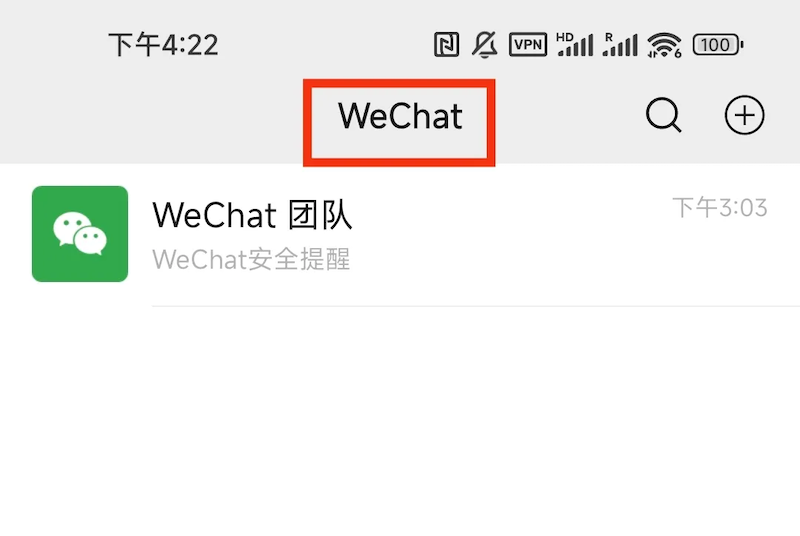
You can also go to "Me" → "Settings" → "About", then tap the Software License and Service Agreement at the bottom. If it shows the WeChat Terms of Service, it is WeChat; otherwise it is Weixin.
🌟 Advantages of WeChat
Data is stored overseas, and stricter privacy rules apply in Europe. The servers are in Hong Kong, and the data controller differs by region:
Region / data controller / location: Mainland China: Shenzhen Tencent Computer Systems Company Limited, Shenzhen. European Economic Area (EEA), UK or Switzerland: Tencent International Service Europe B.V., Netherlands. Other regions: WeChat International Pte. Ltd., Singapore
WeChat also has a clean interface with no ads, and leaves out some small features made for China.
📞 WeChat Out (international calls)
This is a feature Weixin in China does not have. It lets you call mobiles and landlines around the world at low rates, which is very useful for people in foreign trade or who often talk to friends abroad.
⚠️ UK numbers do not currently support WeChat Out, so an account registered with a giffgaff number cannot use it. See the list of supported regions.
📝 How to register WeChat
Download WeChat: an iPhone is recommended. Switch to a non-Chinese Apple ID and download WeChat from the App Store.
Choose the country code: when registering, choose United Kingdom +44 as the country/region code, then follow the instructions on screen.
Complete verification: registration requires verification by text (received on the giffgaff number), and may also require verification by a friend or by bank card.
⚠️ Avoiding risk controls
WeChat's risk controls are fairly strict. Triggering them can restrict the account or, at worst, get it banned outright. To keep the risk as low as possible, note the following:
No proxy or VPN: use Wi-Fi or mobile data directly, without a VPN.
Do not use app cloning or dual-app features.
Do not use a phone that has logged in to many WeChat accounts, such as a second-hand phone from an account farm; accounts registered on such devices are often banned at once.
Do not change devices often after logging in; use the account for a while before making changes.
Do not unblock a WeChat account from a Chinese phone, and do not unblock a Chinese Weixin account from a foreign phone; the two systems are separate.
Do not use a rooted or jailbroken phone.
There is no need to change the system language; keeping it in Chinese is fine.
Pace how fast you add friends: a few friends a week is right for a new account. Adding none at all is not good, and neither is adding many at once.
💡 The general rule: Tencent's risk controls are strict, so do as little as possible with a new account and let it settle in slowly. If the account is banned, see the official guidance: What if self-service unblocking of a WeChat account fails?
🔄 What to know about changing the linked phone number
Changing the phone number linked to the account from +86 to another country code, or from another country code back to +86, moves the account between Weixin and WeChat and triggers a data migration.
⚠️ Changing the linked country code casually is strongly discouraged. It is a high-risk action that can lead to account problems or data loss.